ShrewDNS
Is a piece of software and here is the README.md.
It consists of a very special DNS server, and a very special DNS client.
Use case
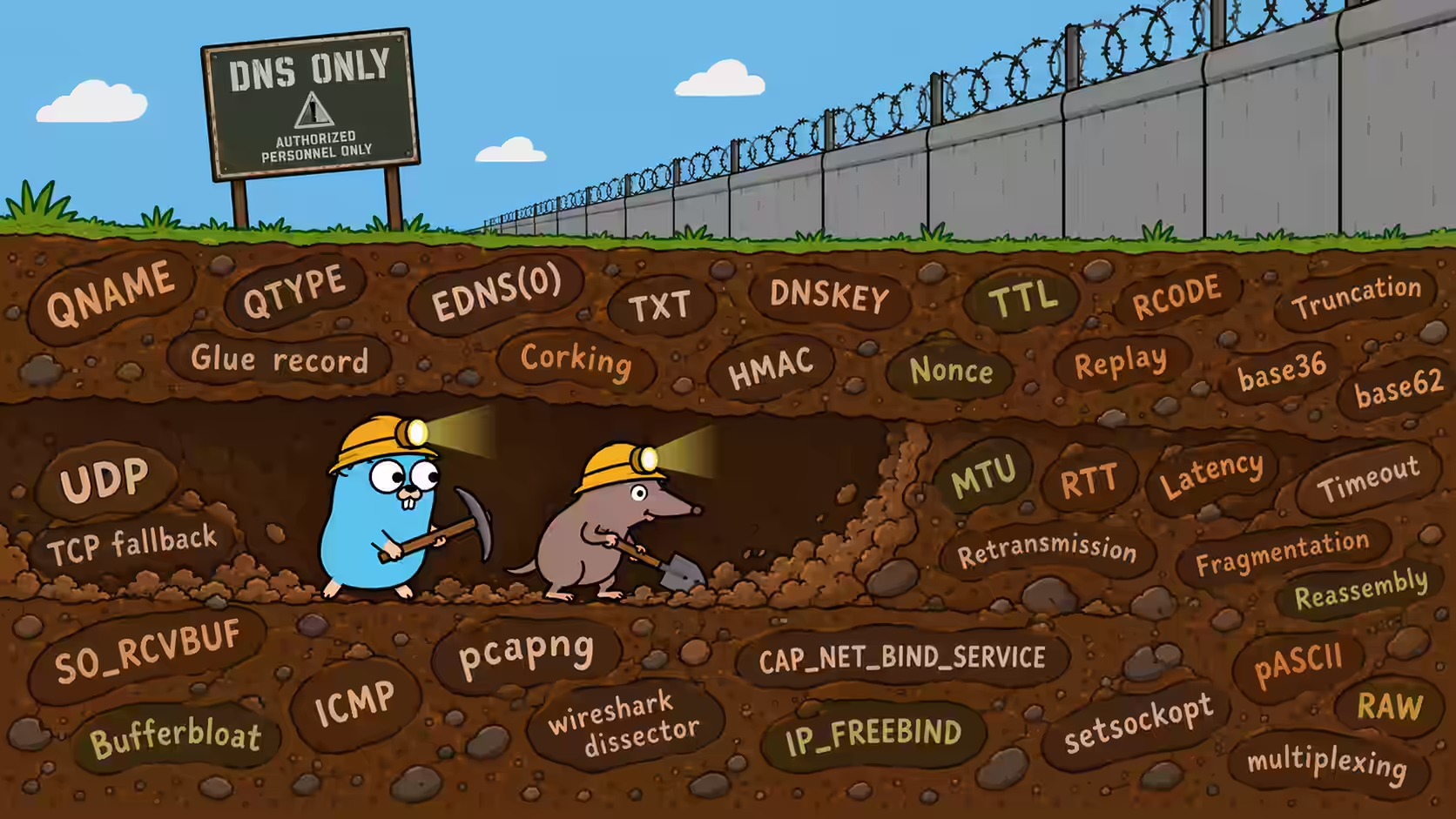
Shrews (Sorex araneus) are mole-like creatures that burrow tunnels. ShrewDNS tunnels UDP over DNS. Such shrewdness.
With some further handiwork, this escalates to FREE INTERNET ON AIRPLANES.
ShrewDNS is useful for escaping from restricted networks that block internet access, yet allow DNS queries out via their resolver (usually advertised via DHCP). Think WiFi captive portals, which you might find at hotels or – increasingly common – miles high on commercial passenger airliners.
Of course, always ask permission. Wave over a cabin crew member, show them a hexdump of the DNS request you’re planning to send, ask if it’s OK.
GIVE ME MY FREE INTERNET OF THE AIRPLANES
You need some …stuff set up to make it all happen, though. The good news is that you don’t need a license or a diploma. But if you need an intro, or refresher, on what DNS is, then you could do worse than to check out this positively antediluvian webpage.
- A domain, with a delegation. You need to own (or borrow) a domain and set up a delegation for it. The shorter the domain, the better, because then there’s more space for the payload!
- Not all clickety-click domain registrars let you set up such a delegation to your own nameservers. Try FreeDNS, where you might be able to borrow a subdomain on which you can set up a delegation.
- Some registries demand that you have at least two nameservers, on different IPs. I got around that by using one A (IPv4) glue record and one AAAA (IPv6) glue record, which are actually the same server with a single ShrewDNS process listening both on IPv4 and IPv6, but they can’t tell (well, not at a glance anyway).
- You can also ask a friend who owns a domain to try to set up a delegation.
- A server box to point those nameserver records at. A server on the internet, with its port 53 UDP+TCP accessible from anywhere.
- Also not a given; some cloud providers may block ingress traffic to port 53 because nothing good can come of it if people run their own nameservers, and when you ask about it, they will ask you if you’ve heard of their cloud nameserver offering.
And then?
And then you run the ShrewDNS server software there.
And then?
And then you grab your laptop, find some restricted network, locate its DNS resolver, point the ShrewDNS client at it, configured with the domain name from the steps above.
And then?
And then you have a tunnel to nowhere.
And it’ll be too late to think about what you actually wanted to run over your tunnel, because you don’t have internet yet, so you can’t reach the server to configure it correctly. It would have been better to think about that while setting up the server. I’ve been told that I explain too much up front, so this is a new rhetorical device I’m trying out: explain things when it’s too late instead.
Anyway. The ShrewDNS server needs to be pointed at a UDP server that does something useful for you. Actually you can point it at up to four such UDP server sockets, including ones that are remote, on another machine entirely even (from the ShrewDNS server’s perspective).
You’ve said “server” fifteen times now and I still don’t have FREE INTERNET
Suggestion: If you already use Wireguard or another VPN that rides on top of UDP in a similar way, then:
- point
shrewdns-serverat its endpoint, - point
shrewdns-clientatshrewdns-server(by way of the domain you procured some steps before, potentially relayed through a resolver on that restricted network), and then - point your local Wireguard peer at the local on-your-laptop mirror-UDP Wireguard peer provided by
shrewdns-client.
UDP packets go into that port, and magically come out of the ShrewDNS server, directed at the UDP server of step 1. Replies travel back the other way. Think of it as a bidirectional wormhole if that helps.
And then?
Well, FREE INTERNET!
Tunneling Wireguard traffic is one of the use cases, since that makes it easy to provide Internet access to all apps on, say, an Android phone, without having to write a full-blown VPN client. It’s easier to use an existing VPN, we just point it at a different endpoint: the local ShrewDNS-provided mirror of its normal endpoint.
But you can use the UDP tunnel any way you want:
- If you point the serverside at a DNS resolver, you can use the clientside UDP endpoint to reach that resolver; so you can indeed use DNS-over-DNS, and yes, even ShrewDNS-over-ShrewDNS if you’re mad.
- You can also just blast a file into it with
socat, and havesocatlisten for that on the other end to save the file.
Use it as you wish, but realize UDP is lossy. When you run a VPN on top, then that’s taken care of “inside” the VPN, because the applications that need it, will be using TCP (or some other reliable-streams-on-top-of-unreliable-datagrams solution) “inside” the VPN.
But if you use the ShrewDNS UDP tunnels, you’re using a lossy transport, and transferring a file over it by just chopping it up over UDP packets and blasting those through starts to sound like a less-than-stellar idea. What to do?
Well, if you need a non-lossy transport, something TCP-like, then a smart way of using the UDP channel is to run the QUIC protocol over it. QUIC (RFC 9000) can be thought of as “TCP in userspace, over UDP”. This gives you a reliable and multiplexed stream transport, which means that by using quicmux, another gadget of mine, you can mirror an SSH server or SOCKS5 proxy server (any number of stream servers, really) on the constrained side. And then you can SSH from that “internetless” side out into that one server, and then connect onwards. Or you can browse the web, using the SOCKS5 proxy.
This is actually much more efficient than running a VPN over it. ShrewDNS just transports bare UDP payloads, without UDP or IP headers – it already does the routing and fragmentation/reassembly/framing that IP/UDP would normally do. Were you to transport that same UDP payload with Wireguard, then in terms of overhead you’d be looking at UDP (8) + IPv4 (20) + Wireguard (32) = 60 extra bytes on top of that payload. Whereas with QUIC, which also gives you encryption and multiplexing (and a reliable transport, like TCP) you’d be looking at just under half that; just 28 bytes of overhead.
THIS IS JUST IODINE
The idea of tunneling over DNS is indeed not new; some two decades ago I was occasionally using iodine which is a full VPN over DNS. I think I managed to read an email or two over IMAP with it, and SSH’ed out to some servers, mired in astonishing latency.
But most of my memories with it were not from using it to actually do internet things, but from tweaking tunnel parameters to try to get it to work better, or at all, and taking perverse pleasure in seeing ping running knowing that what’s going on underneath is insane. Didn’t even feel like visiting websites anymore, I mean, look at ping go!
In that sense the user experience (for tech enthusiasts) was more like engaging in participative art than like using tech. Software that sparked joy, software from a different age.
And it was a different age. Mobile broadband was rare and certainly not cheap. Now, it is no longer rare, and it has become cheap. The modification timestamp on my iodine server config file is in 2018 and I don’t recall the last time I’ve actually used it.
So who still cares about tunneling over DNS? Well, recently I came to the realization that there’s a new niche! Airplane WiFi!
It came about that I took three flights in succession that promised me “free messaging” on their on-board WiFi, but each time I was left disappointed, if not outright miffed, by the revelation that chatting via my own Jabber server apparently didn’t count as “messaging”, and in fact, even using Signal Private Messenger didn’t count as “messaging”.
So while down and out, counting myself among the downtrodden, strapped in my seat (there was sensational turbulence), I rode the wave of irreverence that threatened to overcome me, or in other words, poked around a bit on the network while people’s in-flight snacks were flying through the cabin. Of course I was curious towards how they’re making WhatsApp and Telegram work while blocking others, who wouldn’t be. And while I didn’t get to the absolute bottom of that, it did occur that these networks allow at least some forms of DNS queries to arbitrary zones, including zones that I own, and I was getting the answers back I was expecting, not some kind of spoofed DNS response taking me to some portal.
That’s promising. We can work with that. I will get my “free on-board messaging”. With a bit more work than the average WhatsApp user will have to put in, but I will get it. I’m coming for it. With ShrewDNS.
OK SO HOW IS IT NOT JUST IODINE THEN
One: it’s more portable.
It’s pure-Golang code, very easy to cross-compile, and it doesn’t require any OS-specific VPN glue layer. iodine is more system-invasive as it’s a full VPN, which means dealing with network interfaces and routing tables on both sides. There is an antique Android client app for iodine though! So that’s at least some use case validation.
The ShrewDNS client is a normal network application that needs no special privileges. The server is too, except that you’ll need to run it on the privileged port 53 if you want resolvers to reach it. But also for that there are good options to make binding to port 53 happen without elevated privileges.
Two: the design departure point is different.
I want to focus on the core problem of running a transport over DNS. It’s fun because it’s not meant to exist. There is no map of that territory, no protocol, just the anecdotes of travelers who’ve gone before.
That’s already a handful without the sideshow action of additionally making a full VPN (let alone a multi-OS VPN). Thus the idea is to just provide UDP channels, as a substrate to then let some choice VPN protocol run on top.
That can be more efficient, and easier to reason about! Because if you ping over Wireguard-over-ShrewDNS, you’re actually sending
- Ping payload
- Over ICMP
- Over IP
- Over Wireguard
- Over UDP
- Over IP
- Over ShrewDNS
- Over DNS
- Over UDP
- Over IP
That’s like an extreme version of the box in a box in a box in a box experience you sometimes end up with on the receiving side of modern consumer e-store logistics. Yet if you do UDPing over ShrewDNS as one of the four “UDP applications” you can run, then ShrewDNS will be shuttling the bare minimum: just the UDP payloads, so basically you’ll be sending
- Ping payload
- Over ShrewDNS
- Over DNS
- Over UDP
- Over IP
And that’s a whole lot more efficient!
Along some other axes, it’s apples and oranges. The Wireguard VPN would also give you confidentiality and integrity. But do I need that, for ping? And I still have quicmux which I can run on top of that when I need confidentiality/integrity/a reliable stream transport.
Three: it’s topologically flexible.
ShrewDNS provides four “client slots”, four channels so to speak, individually authenticated. These channels map 1:1 to the UDP sockets that the ShrewDNS server connects to.
You can run four ShrewDNS clients each with one channel on four separate devices against one server, sharing the same endpoint (good for sharing a Wireguard hub), but you can also run one client with all four channels, so you have different application ports.
This makes it possible to give a slot to a friend, for them to connect to their own VPN (or other UDP endpoint), using their own device, but using your ShrewDNS server.
For instance, right now, I have a “udping” channel which just has a UDP echo server on the other side, for quick latency/loss measurements. And I have another channel used by quicmux over which I can access the server’s SSH daemon (over a Unix socket) and its SOCKS5 proxy (over TCP). This is so useful that I didn’t bother with redirecting my Wireguard setup, yet, because being able to SSH out and onwards and access the web over a SOCKS5 proxy fulfills most of my immediate needs when I find myself in the situation that ShrewDNS/iodine are meant for.
Four: it’s a bit easier to play with.
It comes with a web interface that allows you to run probes and become familiar with the inner workings, so you can poke around on the network you find yourself on (some captive portal?), enter some resolver you found into the web interface and see the probes running, and then view/apply the parametrization conclusion based on it. You can serialize parameter sets for fast presets. It’s very hacker friendly this way.
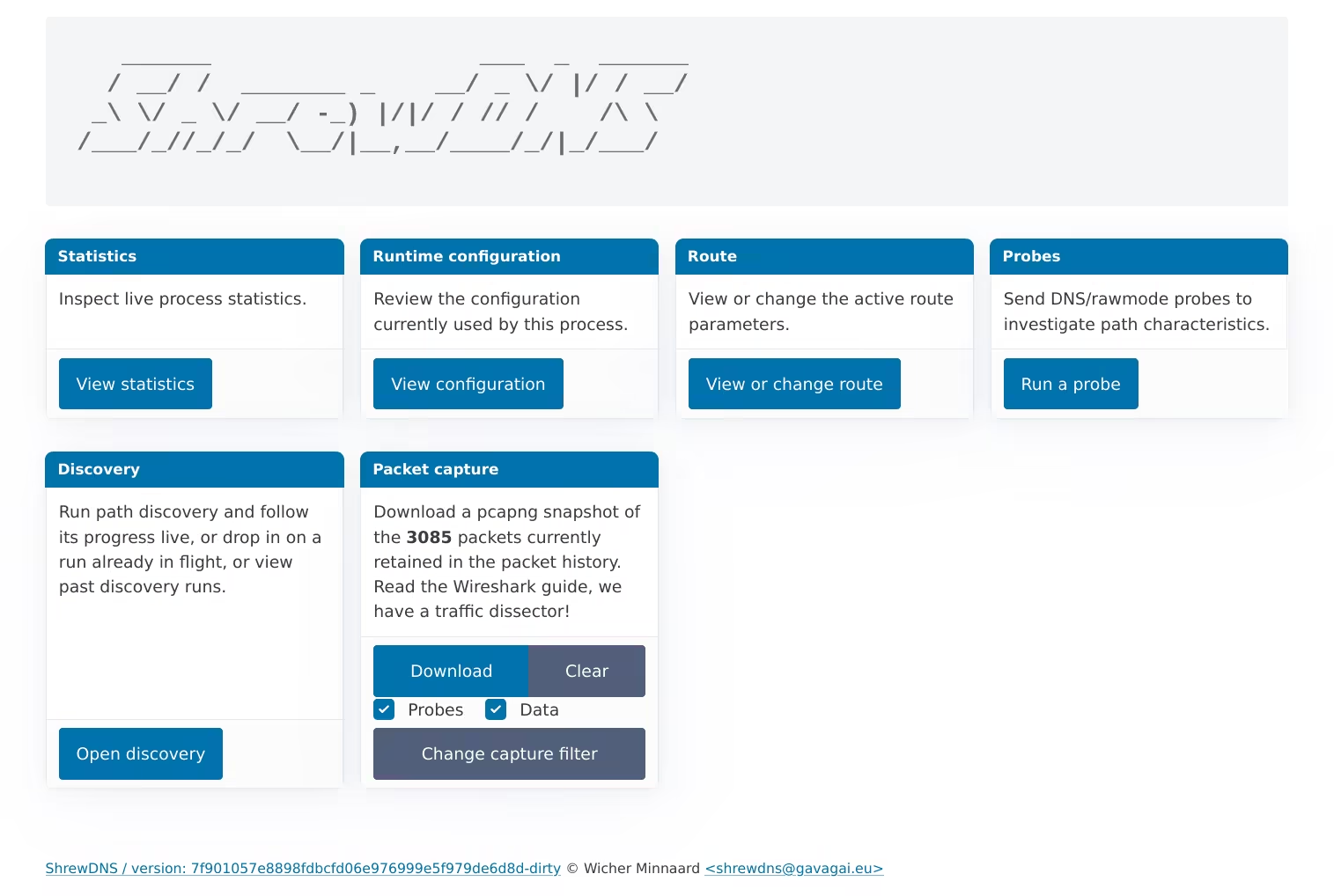
Look, it comes with a packet capture buffer, you can download a pcap of what transpired right from the web interface! Load it up in Wireshark, and then run the included Lua protocol dissector to lay all those packet fields bare. Design a new transport, or improve the connection management algorithms, go wild.
Five: it’s probably a bit safer.
The internet is a more hostile place to run a public UDP server now than it was 20 years ago. So we have some mutual authentication, and some protection for DNS reflection/amplification attacks. Explained below, and at length in the actual documentation.
Furthermore, ShrewDNS is written in Golang, which is considered a memory-safe language while C, in which iodine is written, very much isn’t. And ShrewDNS can be compiled as a static binary which makes it very easy to isolate, in fact it comes with a SystemD service file to use for the server showing how to run it with little privileges and a high degree of isolation from the rest of the system.
Six: DNS has evolved.
Especially around DNSSEC. So far the DNSKEY record type has proven to be a nice find for carrying large chunks of binary data downstream, disguised as a bunch of RSA-4096 keys. iodine doesn’t have it! (It has many more, though, while ShrewDNS only has TXT and DNSKEY at the moment.)
Seven: it’s mine.
This is my DNS tunnel implementation. There are many like it, but this one is mine. It’s just my own take on the problem, and I’m tackling it from first principles, because that’s the point. And I had a different design from iodine’s in mind as well.
iodine has the concept of a “session”, serverside, whereas I wanted a server that’s as stateless as possible, with all control on the client side. Being stateless means we’ll have to carry everything the server needs to know in terms of what we want the response to look like, in every request, while we don’t have much space, so that then becomes a fun micro-challenge with expressing things in bit fields that are just 2 or 3 bits wide. Very cathartic if you’ve been doing some web development, and all that spraying out of verbose JSON has been weighing on your conscience.
Furthermore, iodine has retransmissions, whereas with ShrewDNS this is the responsibility of a layer put on top of our UDP channel, by choice. Yet I think there are a few cases in which we could do retransmissions as well, especially considering that a request is idempotent anyway, due to the server’s replay protection, thus we don’t have the classic problem of needing to distinguish between “payload got lost on the way up” versus “confirmation got lost on the way down”. Warrants an experiment! This is going to be an eternal fountain (bottomless pit?) of engineering joy. After all, consider TCP is 52 years old, yet just in the last decade four new TCP congestion control algorithms have been added to the Linux kernel, underlining that packet-switched networks are enormous fun.
Thus what’s probably not different from iodine is the underlying motivation for building it, and the joy of toying with it. If measured solely by the time and LLM credits I’ve put into this, I should’ve just bought the in-flight WiFi. But this toy is more captivating than TikTok. There’s surprises. Mysteries. Challenges. Among which:
Surprises
- Case randomization. Some resolvers (eg Google’s
8.8.8.8) decided they need more randomness in their outgoing requests, to harden against Kaminsky-type cache poisoning attacks. So they randomly change the case of the letters in the upstream leg of the request. You don’t see it on the downstream leg. Fun! - QNAME minimization. Some resolvers (eg Unbound, in its default configuration) will, as part of “QNAME minimization” (RFC 9156), query an authoritative nameserver for some A records while the originating client was requesting something else (say a TXT record).
Challenges
- Request/reply only. DNS is a request-reply situation, which means the server cannot just send us data of its own accord. Say we ping it, and a little bit later the pong comes back. It can’t reach us. There’s no path. We need to ping it again (or at least, send it another request), in order to pick up that pong that’s waiting for us there! We have to drive these packets everywhere, they’re just helpless. This problem cascades into:
- having to come up with adaptive polling regimens that work well under high latency
- suppressing the urge to introduce buffers and queues everywhere to smooth things out (or over?), because those just make the situation worse, a phenomenon called bufferbloat
- potentially, terrible experiences for interactive traffic (remote shells), but we can do something about that by keeping a request waiting at the server for some response to come, which is good for interactive traffic such as SSH: send a keystroke up, and SSH will echo the character back on the return trip, in the DNS reply, if we wait for it, which cascades into
- resolvers do not like to be kept waiting, so now we’ll need to probe them to find out for how long we can stretch their patience
- Comically small packets. Having only about 140-220 bytes of upstream payload capacity in a request. Those are comically small packets. This problem cascades into
- we’ll want to use every part of the buffalo, stuffing every nook and cranny of request (and response) payloads, but we will still need to make it look like a proper DNS request and response to the DNS resolver acting as our relay. This problem cascades into
- Inventing various exotic codecs, in our case base36 (not a typo), base62 (also not a typo), pASCII (still, not a typo), to make the most of the available space. This problem cascades into
- the delightful property of these efficient codecs that their symbol series length varies with the byte values being encoded. Eg, in Pythonese,
base36(b'\x00') == '0a'whilebase36(b'\xFF') == '1edm'— one byte encoded, but in the former case into 2 symbols, in the latter case into 4 symbols.1 Anyway, that problem cascades into- Not being able to directly answer the question of “how many more bytes can we still stuff into this packet?” because the answer is… “depends on the bytes”. This compounds, as we have an HMAC for authentication (we’ll get to the why of that), which is computed over the payload (of course), and then encoded… with variable-length outcome, potentially turning “it fits snugly” into “dammit just one byte too long”. There’s no way around it, fitting data into the packets using this scheme is a question of… trying fitting, and trying fitting again, and again. Which cascades into…
- Low on resource usage, this program will not be. It’s going to be all about the pentiums.
- Not being able to directly answer the question of “how many more bytes can we still stuff into this packet?” because the answer is… “depends on the bytes”. This compounds, as we have an HMAC for authentication (we’ll get to the why of that), which is computed over the payload (of course), and then encoded… with variable-length outcome, potentially turning “it fits snugly” into “dammit just one byte too long”. There’s no way around it, fitting data into the packets using this scheme is a question of… trying fitting, and trying fitting again, and again. Which cascades into…
- so then we have specialized codecs, how wonderful, but now we’ll need to probe the path to find the most efficient one that the resolver will still swallow, both on upstream, and potentially a different one on the downstream, potentially varying per request type (TXT, DNSKEY, …)
- the delightful property of these efficient codecs that their symbol series length varies with the byte values being encoded. Eg, in Pythonese,
- Inventing various exotic codecs, in our case base36 (not a typo), base62 (also not a typo), pASCII (still, not a typo), to make the most of the available space. This problem cascades into
- the need for fragmentation; we’ll need to break up normal-sized packets arriving on our upload interface into these dwarf payloads, for a quotidian ~1400 byte packet payload we may need as much as 10 (!) separate requests to get the thang across, which cascades into
- did I say terrible latency somewhere yet? I probably did. TERRIBLE LATENCY. Of course we’ll run many requests in parallel, so that it’s not 10×RTT, but that just brings us to the next problem, which is
- How Parallel Is Too Parallel, does the resolver like it when we blast it with 600 requests, all going to that same funny nameserver?
- a high risk of having to give up on packet reassembly, as one fragment going missing will spoil the whole show, which cascades into
- pathological behaviours with retransmission of data that did make it through, when trying to run some reliable transport (TCP, QUIC, TCP-over-IP-over-Wireguard) on top of this house of cards, much worsened by
- the aforementioned latency, which exacerbates the information gap on both sides of the connection, thus impacting the retransmission efficiency
- the asymmetry in bandwidth of the connection (down: slow, up: even slower)
- the enormous amounts of data we expect to be able to transfer nowadays (’90s web would work fine on this, though)
- pathological behaviours with retransmission of data that did make it through, when trying to run some reliable transport (TCP, QUIC, TCP-over-IP-over-Wireguard) on top of this house of cards, much worsened by
- fragments arriving out of order, which cascades into
- having to maintain quite generous packet reassembly buffers, which cascades into
- this not running well on a 486
- having to maintain quite generous packet reassembly buffers, which cascades into
- we’ll want to pack multiple fragments into a packet, but that brings us the next problem, which is: we now need to express what fragment belongs to what packet, and in what order, the expression of which, exquisitely engineered as it may be, eats into the payload budget, AGAIN
- did I say terrible latency somewhere yet? I probably did. TERRIBLE LATENCY. Of course we’ll run many requests in parallel, so that it’s not 10×RTT, but that just brings us to the next problem, which is
- we’ll want to use every part of the buffalo, stuffing every nook and cranny of request (and response) payloads, but we will still need to make it look like a proper DNS request and response to the DNS resolver acting as our relay. This problem cascades into
- Caching resolvers. Resolvers cache query-response pairs (sort of) and some will treat the immediate-expiry TTL of 0 as advisory and will happily serve a stale record for that same question. So then if we happen to send a packet identical to one we’ve sent before, then we’d get an old downstream packet back from that resolver, and the server will never see our upstream data payload. To avoid that, we fiddle with a counter field (20 bits of entropy) to make the request unique. That problem cascades into
- having to maintain a history of requests, or a hash of them at least, but we don’t want it to grow without bounds, still it’ll eat memory, which cascades into
- this not going to run well on a 486
- having to maintain a history of requests, or a hash of them at least, but we don’t want it to grow without bounds, still it’ll eat memory, which cascades into
- Resolver retries. Resolvers may retry their query if the response between our nameserver and them gets lost, which is a thing. But by retrying, they are basically reinjecting traffic, and we don’t want that! This problem cascades into
- Having to maintain some kind of log to check if we’ve already seen a given DNS request. Good thing that they should all be unique anyway, because of the other problem, the caching problem. Anyway we know that if we’ve already seen some request, we don’t want to process it again, but there’s a problem, because
- we can’t track all of this forever, so we’ll need a bounded log, for say a million requests, which again will mean that
- run on a 486 well, this will not.
- we can’t track all of this forever, so we’ll need a bounded log, for say a million requests, which again will mean that
- Having to maintain some kind of log to check if we’ve already seen a given DNS request. Good thing that they should all be unique anyway, because of the other problem, the caching problem. Anyway we know that if we’ve already seen some request, we don’t want to process it again, but there’s a problem, because
- Offering an attack surface to the wide internet. To get random resolvers (not yours) to give you Very Special DNS Answers to your Very Special DNS Requests, it needs to talk to your Very Special Authoritative DNS Server, which means that we will have to be running as one, as a (countercultural) citizen of the true honest internet domain name system. Not without risks, it cascades into some potential problems:
- We don’t want our server to be used as an unwitting ancillary in a DNS reflection/amplification attack. Yet responding to small messages with maxed out responses (and we do want to max out our responses!) is exactly what would make us a prime ancillary.
- we don’t want random people to be able to inject traffic just by sending a request, neither do we want them to be able to bereave our legitimate client from the downstream data waiting for them by responding to such requests. Even under the assumption that we’ll be carrying encrypted data on top (such as Wireguard, or a QUIC stream) that will protect the integrity of the stream and hopefully ignore the injected data, we will not want to respond with downstream data (even if it’s encrypted and useless) because that means our legitimate client will not be getting it! If you know the protocol, and the domain name we’re using, then you can set up a permanent attack that just drains all packets destined for our legitimate client, continuously. So obviously we’ll need authentication, which brings us to our next problem
- we are NOT swimming in space, so sure an authentication header sounds nice, but are we going to spend 32 bytes on an HMAC, out of a ~140 byte upload budget? No of course not, so here’s our next problem
- ok we will use short HMACs then, oh ok VERY short HMACs, ok we can spare 2 bytes, which brings us to our next problem,
- obviously an attacker can online-bruteforce a 16-bit HMAC, it just has to send (a maximum of, if they’re unlucky) 65536 requests to our server to find a valid request (which, lucky for us, is then immediately spent and can’t be used again, because of our replay prevention, which we already had anyway) and then we’d leak one downstream packet to it, which is still a thing we’ll want to avoid, which brings us to our next problem,
- detecting such a brute force attack to then tempban the source, which is distinguishable by an insane ratio of HMAC-failing vs HMAC-verification-passing packets, but we’ll have to keep tabs on all these traffic sources and their success rates, and thus, the next problem,
- run on a 486, this will not well
- detecting such a brute force attack to then tempban the source, which is distinguishable by an insane ratio of HMAC-failing vs HMAC-verification-passing packets, but we’ll have to keep tabs on all these traffic sources and their success rates, and thus, the next problem,
- obviously an attacker can online-bruteforce a 16-bit HMAC, it just has to send (a maximum of, if they’re unlucky) 65536 requests to our server to find a valid request (which, lucky for us, is then immediately spent and can’t be used again, because of our replay prevention, which we already had anyway) and then we’d leak one downstream packet to it, which is still a thing we’ll want to avoid, which brings us to our next problem,
- ok we will use short HMACs then, oh ok VERY short HMACs, ok we can spare 2 bytes, which brings us to our next problem,
- we are NOT swimming in space, so sure an authentication header sounds nice, but are we going to spend 32 bytes on an HMAC, out of a ~140 byte upload budget? No of course not, so here’s our next problem
If you’ve made it through the preceding prose, then you may be thinking:
this thing should outright not exist.
But it does.
$ dd if=/dev/urandom bs=512K count=1 status=none | ssh -p 1983 localhost 'cat -' | pv -pterabW -s 512K > /dev/null
 512KiB 0:00:14 [36.3KiB/s] (36.3KiB/s) [==========================>] 100%
It really does.
$ udping -W 5 -i 0.02 -s 50 -c 10 127.0.0.1:9007
PING 127.0.0.1:9007 (127.0.0.1) 50(70) bytes of data.
70 bytes from 127.0.0.1:9007: seq=3 time=104.014 ms
70 bytes from 127.0.0.1:9007: seq=0 time=361.542 ms
70 bytes from 127.0.0.1:9007: seq=1 time=341.433 ms
70 bytes from 127.0.0.1:9007: seq=2 time=321.282 ms
70 bytes from 127.0.0.1:9007: seq=4 time=343.296 ms
70 bytes from 127.0.0.1:9007: seq=5 time=322.768 ms
70 bytes from 127.0.0.1:9007: seq=6 time=342.046 ms
70 bytes from 127.0.0.1:9007: seq=7 time=321.705 ms
70 bytes from 127.0.0.1:9007: seq=8 time=346.114 ms
70 bytes from 127.0.0.1:9007: seq=9 time=325.504 ms

--- 127.0.0.1:9007 ping statistics ---
10 packets transmitted, 10 received, 0% packet loss, time 510ms
rtt min/avg/max/mdev = 104.014/312.970/361.542/70.777 ms
Footnotes
-
to have fun with such encodings, which are really just alternative number systems, look here! ↩